Blueprint calculates when every feature will land, team by team, from priority, dependencies and capacity. Every update, and every sprint that passes, replans the roadmap. Nobody maintains it by hand.
Built into Conductor. Available for Jira Cloud and Jira Data Center.
25,000+ features
recalculated in under a second
About 30 seconds
for a team to update a feature
One plan
for teams in Conductor and teams in Jira
The engine
Three inputs. One calculated plan.
You decide what matters most, what depends on what, and how much each team can do. Blueprint does the calculations, for every team at once, and keeps doing it as things change. Blueprint allows you to create a system that takes all dependencies and priorities into account (internal and external) and gives you the optimal plan.
1
Priority order
1 ordered backlog per value group (one or more teams)
2
Dependencies
Between features and between teams
3
Team capacity
Sprints needed and share of the team
Try it. Move a feature up or down and watch every team replan.
Backlog · priority order
1
CSV export
Invoicing
2
Payment reminders
Invoicing + Mobile
3
Invoice export in the app
Mobile
4
Bulk invoice actions
Invoicing
5
Notification settings
Mobile
Feature plan · calculated
Q1
Q2
S1
S2
S3
S4
S5
S6
S7
S8
S9
S10
S11
S12
Invoicing team
CSV export
S1-2
Payment reminders
S3-4
Bulk invoice actions
S5-7
Mobile team
Payment reminders
after its Invoicing part
S5-6
Invoice export in the app
after CSV export
S7-9
Notification settings
S10-11
Roadmap · when each feature lands
CSV export
Sprint 2 · Q1
unchanged
Payment reminders
Sprint 6 · Q1
unchanged
Invoice export in the app
Sprint 9 · Q2
unchanged
Bulk invoice actions
Sprint 7 · Q2
unchanged
Notification settings
Sprint 11 · Q2
unchanged
A sample with two teams and five features. Your real plan works the same way, for 25,000+ features in under a second.
How it works
From ambition to sprints, in four steps.
The same structure from the boardroom to the team, so a change at one level shows up at every other level.
Step 1 of 4
Roadmap
The ambition of a value group, as initiatives per quarter. Each initiative gets a What (what we are trying to achieve) and a How (how we will achieve it).
Step 2 of 4
Feature map
Link features to initiatives. Per feature: which teams work on it, how many sprints each needs, what share of the team, and which team waits for which.
Step 3 of 4
Backlog
One ordered list, grouped by initiative if you like. Drag a feature, or a whole initiative, to reprioritise. You see which teams still owe an estimate.
Step 4 of 4
Feature plan
The calculation: features in sprints for every team. Each update recalculates it, and the feature plan updates the roadmap.
Optional
Initiative refinement, optional
A board that takes an initiative from idea to ready, shaping its What, How and feature map on the way. AI can assess the quality of an initiative and suggest improvements.
Taskstreamer in Jira
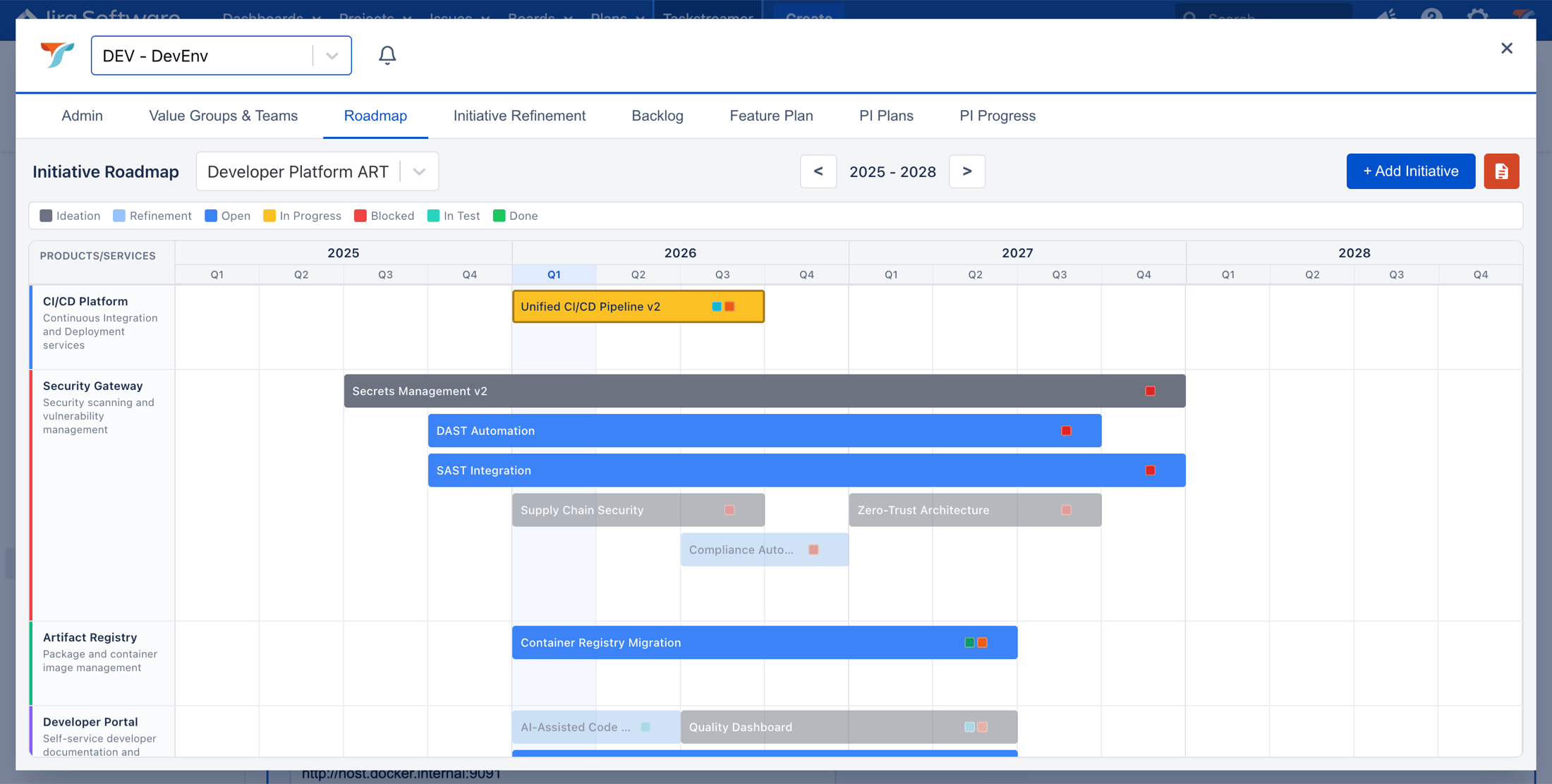
Roadmap. Initiatives per quarter for a value group, coloured by state. It moves with the feature plan.
The roadmap updates itself
Lock the feature map and the roadmap follows every feature update automatically. Prefer more freedom? Keep it open: the roadmap still moves with the work, and you can drag by hand.
Team updates
Teams update in seconds. Everyone sees the effect.
A product owner or scrum master sets the state of their part of a feature. Blueprint replans every team that depends on it.
Open
Clears what was set. The item moves to its recalculated sprint.
In progress
The start date fixes where the bar begins. Sprints remaining set where it ends.
Blocked or postponed
An expected date pushes the item, and everything that depends on it. Other work moves forward to fill the gap.
Done
The completion date closes the bar, shown in green.
Time replans too
When a sprint ends without an update, unfinished work moves to the next sprint. The plan never pretends.
Feature plan · Invoicing team
Sprint 3 is now
S1
S2
S3
S4
S5
S6
S7
S8
Export service
Done
CSV export
In progress
Bulk actions
Blocked
Replanned
Notifications
Promised
Now expected
■ Done■ In progress▢ Blocked▢ Ghost of a promise or lock
Commitments
Promises that stay honest.
Some dates are commitments. Blueprint keeps them visible, and shows you early when reality drifts away from them.
Locked
A locked item stays in its sprints, whatever else changes. It only moves when something it depends on is late, and then a ghost shows where it was meant to be.
PI promise
Plan each Program Increment, collect confidence votes per team (committed, cannot, pending) and add notes for stakeholders. Promised items stay visible where they were promised.
PI progress · expected delivery
85.7%
12 of 14 promised items expected in this PI
Recalculated every sprint: what needs an update, what was updated, and what is pushing on the promise.
Program Increments are optional. Switch them on only if you work that way.
Taskstreamer in Jira
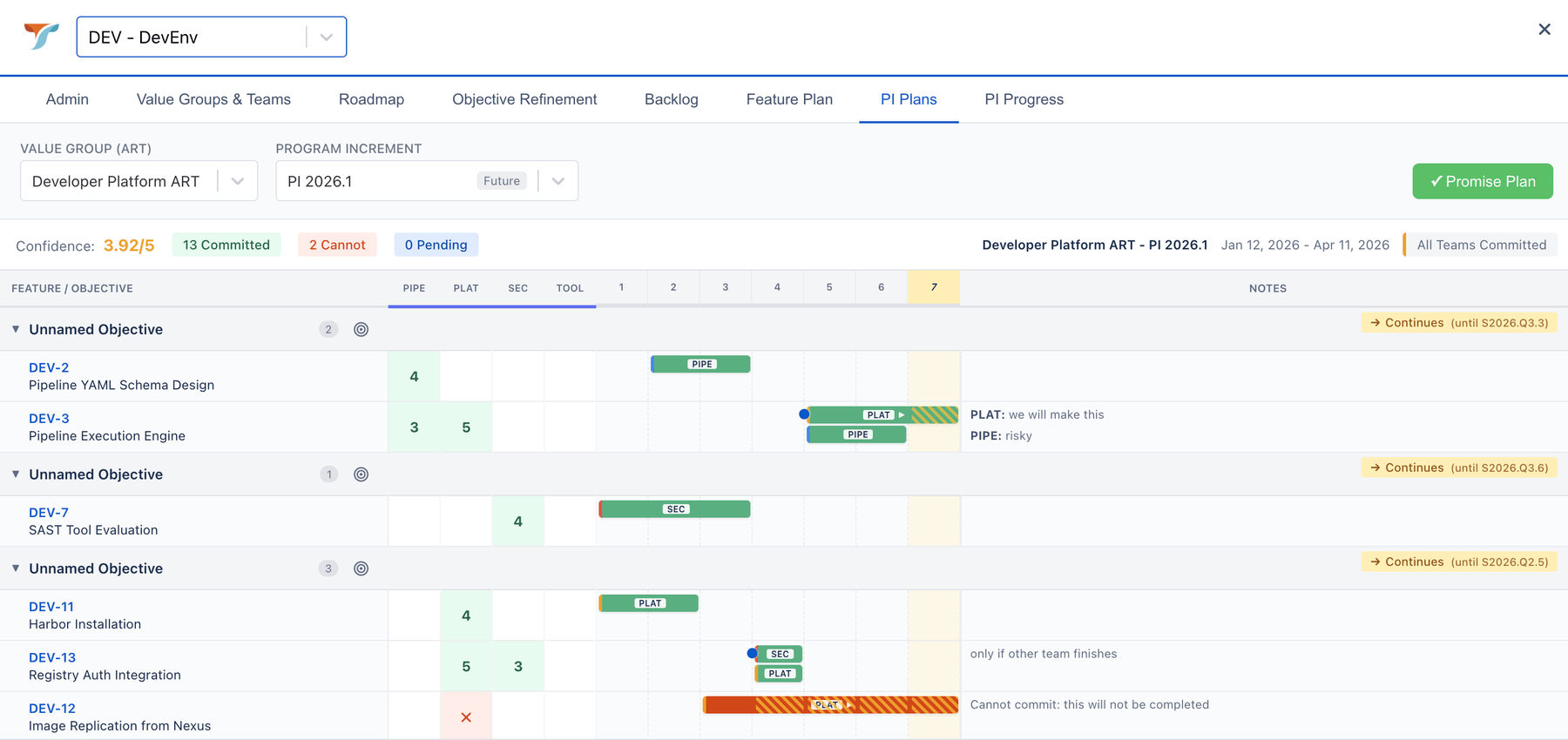
PI plan: confidence votes per team, with notes for stakeholders.
Taskstreamer in Jira
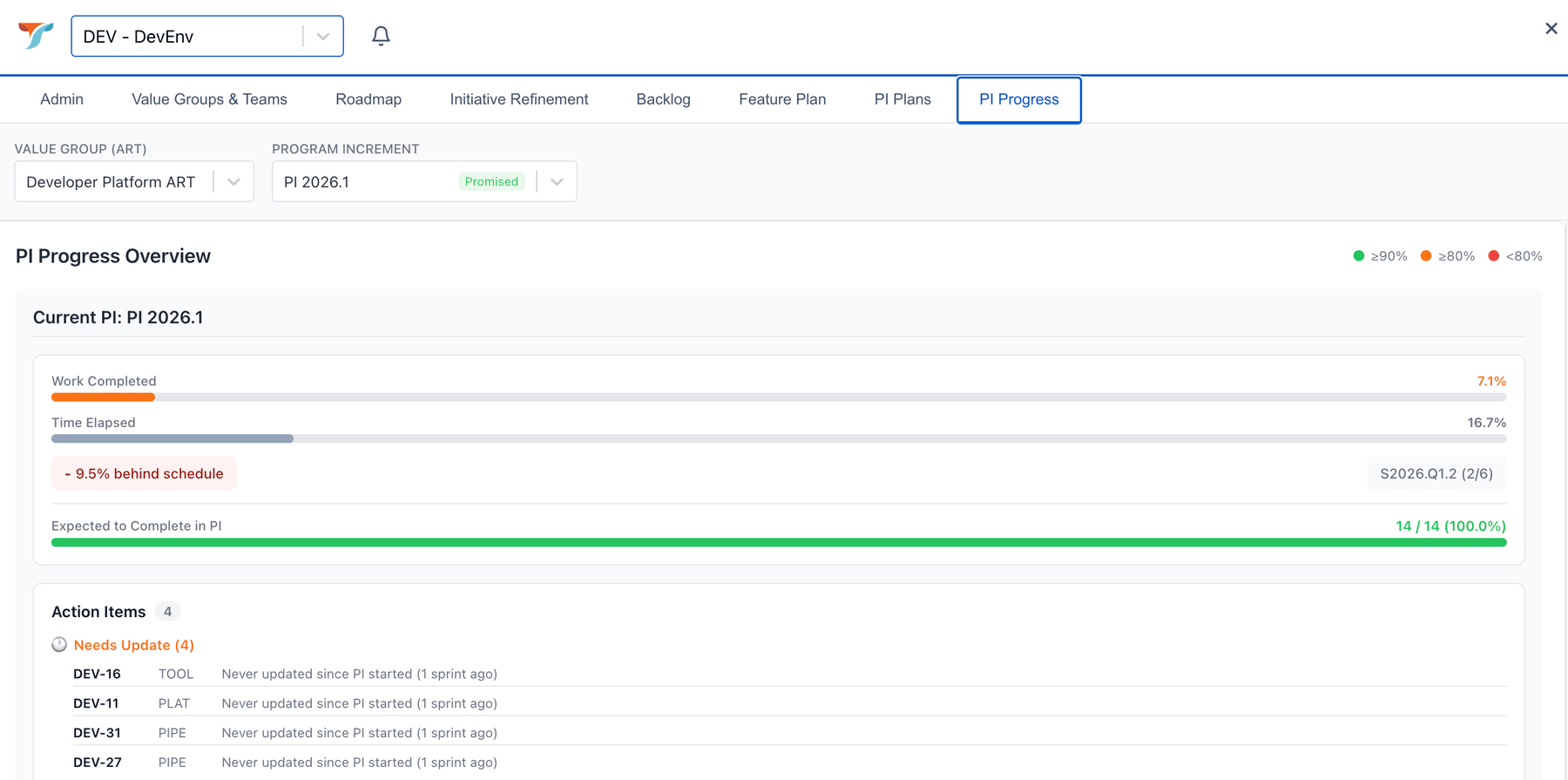
PI progress: work done against time, expected delivery and what needs an update.
Your way of working
Fits how you already plan.
Projects, quarterly planning, full SAFe or small autonomous teams: Blueprint follows your structure instead of forcing a framework.
Programs and projects
Strategy: program goals in OKR or OGSM
Roadmap: an initiative per project or per large phase
Features as sub-phases, with the iterations they need
Teams: stories per feature, in iterations
Agile, the common way
Strategy in OKR or OGSM
Roadmap: initiatives per value group, from a vision aligned with strategy
Quarterly: PI events to promise delivery, if you use them
Teams: stories per feature, in sprints
SAFe
Strategy in OKR or OGSM
Roadmap: initiatives per value group (your ART)
Quarterly: PI planning with confidence votes and PI progress
Teams: stories per feature, in sprints
Deep Agile
Strategy: program goals in OKR or OGSM
Features as small goals, aligned to strategy by product owners
Feature plan calculated, no quarterly layer
Teams: stories per feature, in sprints
About value groups. A value group is a set of teams that deliver value together. You may call it an ART, a train, a domain, a program or a value stream. Blueprint uses a neutral name, and you can rename every label to your own terms, initiative included.
Blueprint in Jira
Your teams stay in Jira. The plan comes with them.
Blueprint in Jira is a plugin for Jira Cloud and Jira Data Center. Teams enter their estimates where they already work, and the whole plan is one click away. No separate login and no data sync.
On every feature
A widget in the issue
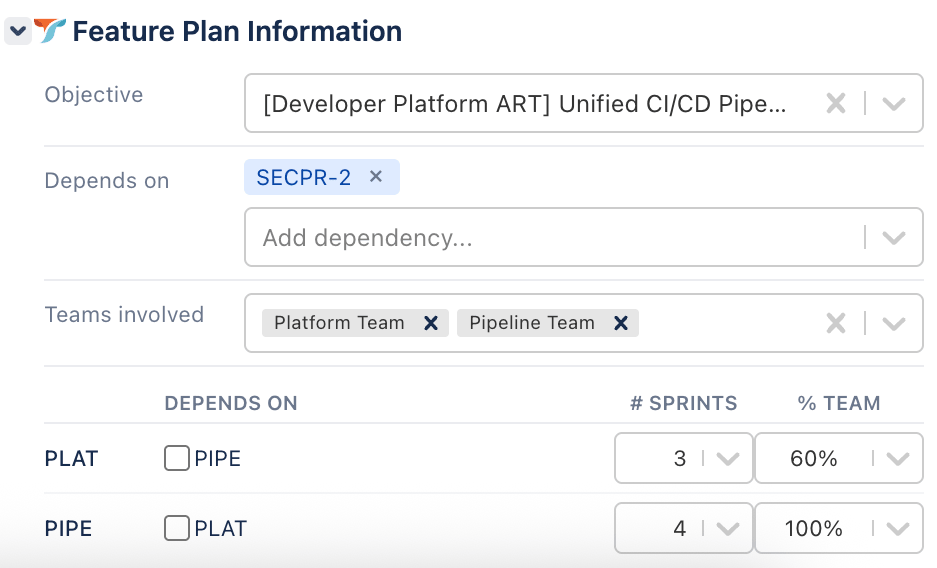
Pick the initiative it serves, the teams that work on it, the sprints each team needs, the share of the team, and the dependencies between them. On the issue types you choose.
From the menu
The full Taskstreamer view
Roadmap, initiative refinement, backlog, feature plan, PI plan and PI progress. If Strategy is shared, also strategy and epics, where demand from management arrives.
Admin
Set up in a day
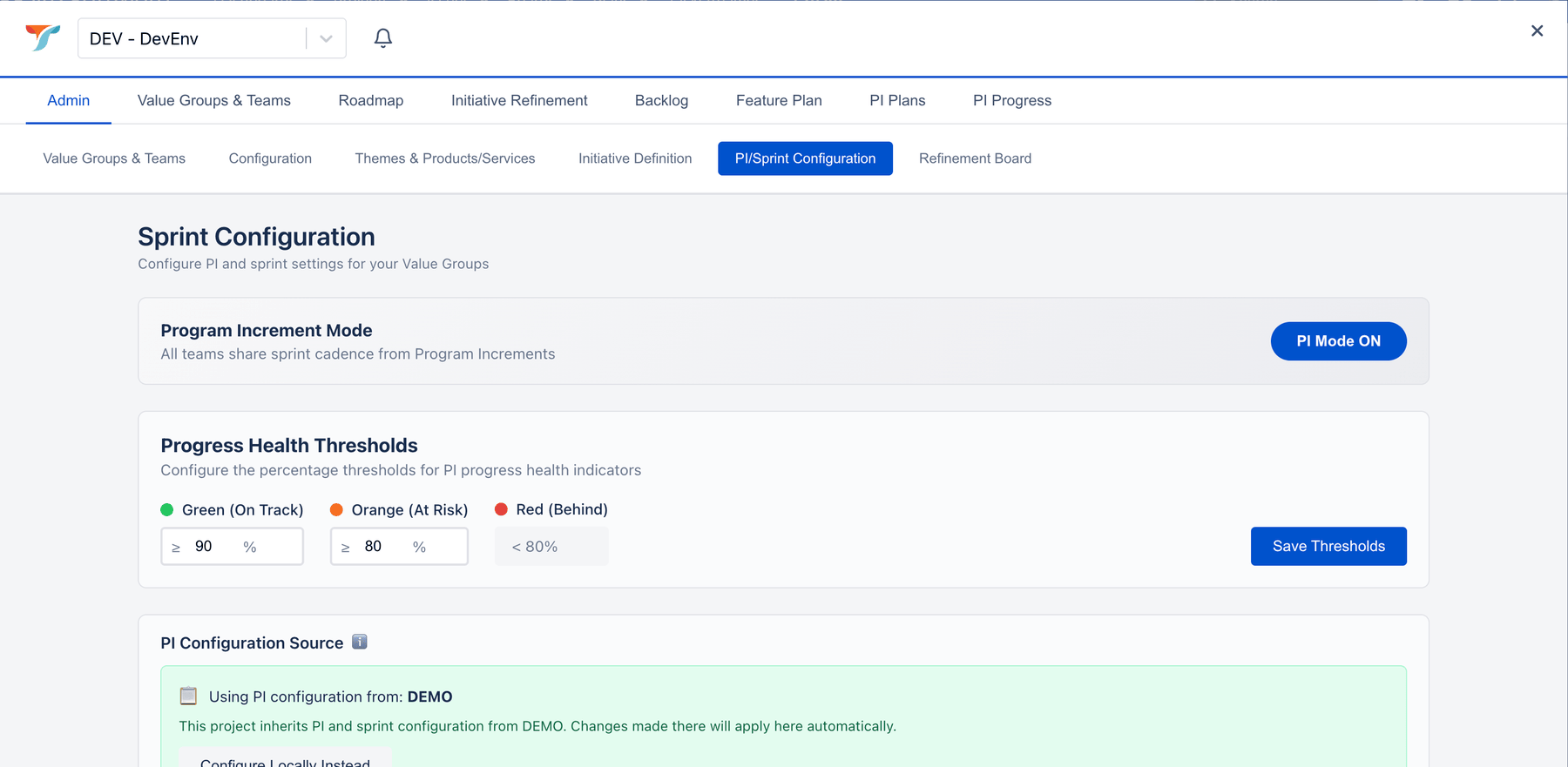
Choose the projects, roles and access. Set labels, sprint cadence, Program Increments on or off, value groups, and per team its size and its product owner and scrum master.
Free for Conductor customers. Teams in Jira and teams in Conductor share one plan.
The widget on a Jira feature: initiative, dependencies, teams, sprints and share of the team.
Taskstreamer in Jira
Admin: switch Program Increments on or off and set your own health thresholds.
For portfolio managers
Stop maintaining the roadmap. Start using it.
You were not hired to update spreadsheets and slide decks. You were hired for judgement: seeing what is coming, weighing options, advising the board. Blueprint takes over the arithmetic, so that is where your week goes.
Your week now
×Collect status from every team, every week
×Recalculate timelines by hand when a priority moves
×Trace dependencies across teams in spreadsheets
×A board question on Wednesday becomes a presentation on Friday
Your week with Blueprint
✓The roadmap recalculates itself with every update and every sprint
✓Spot risks early, like two teams needing the same platform capacity three sprints out
✓Model scenarios before leadership asks
✓Bring three options to the meeting where the question is asked
“The roadmap is no longer your deliverable. It's your instrument.”
Strategy shows progress on goals straight from the work in Blueprint: every roadmap combined, per department or per value group, down to the features of an initiative. And it answers the questions leaders ask before they decide.
Re-order priorities
What comes sooner, and what later, across all roadmaps?
Add FTEs
Where would extra people add the most value?
Cut FTEs
Where does a cut hurt the least?
Hit a deadline
What has to change, with the least impact: priority, people or both?
We use cookies to improve your experience, analyze site traffic, and for marketing purposes. By clicking "Accept", you consent to our use of cookies. Learn more